0.142.19
Every piece of work, on its own page
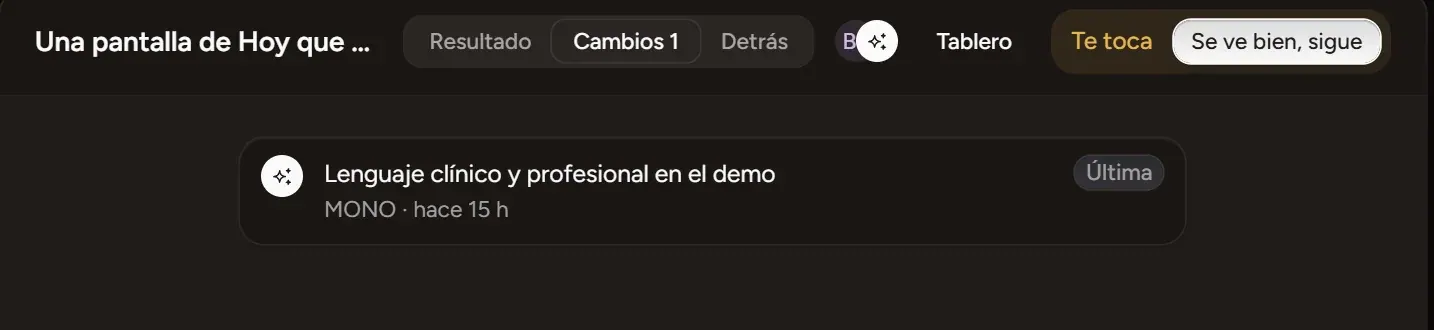
A board card opens as its own page: what it produced, its versions with who made them, and where it came from. And its conversation opens beside it.
- New
Who still has to review
A requested review stays at the top of the work: the question, who answered and who's missing. Whoever was asked gets «Yes» and «Not yet».
- New
MONO checks the page first
Before anyone, MONO measures the page: text without contrast and text cut off, with «Fix» so it corrects them.
- New
What the client sees
A new face of the work: the published screen it changes, as people see it today. And «How it works» with its diagrams.
- New
Ask for review with a question
On a work's page, «Ask for review»: say what needs deciding and who, and it reaches them as a mention. Beside it, what MONO already checked on its own.
- New
The product map
On the Board, «Map»: every screen of your app with its photo, how it connects to the others and which works are changing it. And every work has its «Flow»: the screens it changed, along their path. MONO reads it every turn, so it changes the right file.
- New
The project's works
On the Board, «Works»: each work with a photo of its result and where it's at; what's your turn, first. The usual board is one click away.
- New
Point and ask
On a work's result, «Point at something» and drag over what you want changed; write it and MONO does it. It comes back as a proposal with before and after: «Accept» or «Deny», which undoes it.
- New
What the team is on
On Home, every live piece of work with what it's at and who asked for it. And every project has its Chat channel, where MONO leaves one line when something starts, has a new version or is done.
- New
«Open» on the card
In a card's detail, «Open» takes it to its own tab: Result, Changes and Behind it. At the top, what you need to answer.
- New
One conversation
When you open it, the conversation on the left switches to that work's. Pick a version and your message goes «About» it; with @name you tell someone without MONO answering.