0.142.6
Your customer's whole story
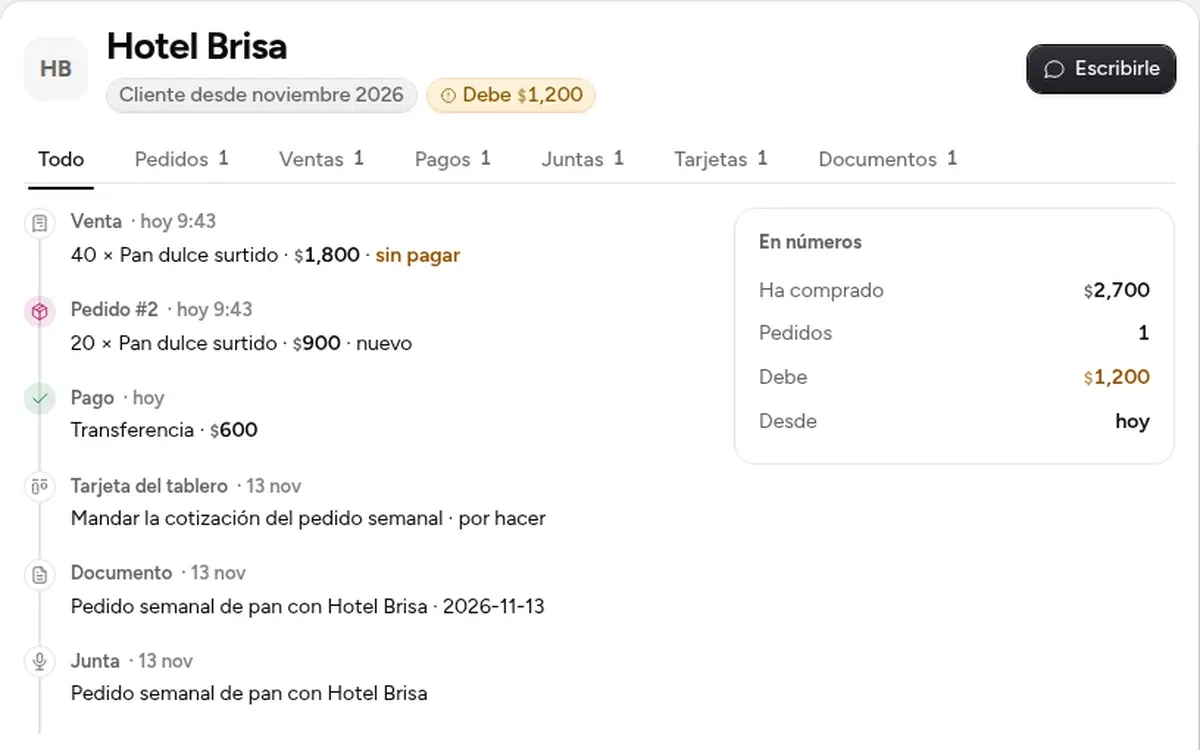
A customer's page now also shows their meetings, the cards those left on the board and their minutes. And a payment entered wrong can now be corrected or voided.
- New
Meetings, cards and minutes on the page
When you send a meeting's follow-up to a customer's email, that meeting, its cards and its minutes show on their page, and each opens with one click. It shows in that project's workspace and in the one for your whole server; Calendar also gathers those of all your projects.
- New
Correct or void a payment
In your back office, «Pagos» on a sale lists its payments with «Corregir» and «Anular»; in the store they show when you open the order. Voiding does not delete: it stays on record, and the sale goes back to «Por cobrar» by itself. For an app you already had, ask MONO to set it up again.
- New
Build in view
In Sites, the menu of an app MONO built on your server has «Build»: it opens the app with this round's changes and its versions beside it.
- New
The model picker says which models are billed separately
With a plan connected (Kimi, ChatGPT or Grok), the models served by your plan say «your plan» and the rest say «billed separately». And if a paid one is picked for something simple, MONO does it on the plan and tells you in one line.
- Fixed
A partner now gets their key to approve
If you joined a team with an invitation code and the owner gave you a key to approve, “Confirm it's you” now hands it to you; before, it said your account had no MONO.
- New
Making someone a partner now gives them their key
In Team, making someone a partner gets their key to approve ready, and their card tells you what's left. If MONO doesn't know their email, you type it right there.
- Fixed
Answering MONO no longer asks for your PIN
When MONO asks you something (for example, whether to open a preview), your «yes» is one click. Confirming it is you stays only for publishing, sending, charging or deleting.
- Fixed
Faces in the chat are readable in the light theme
In the light theme, each person's initials in the conversation came out in a very pale color. Now they adjust to the light background, as they already did on the desk.